
What if you could describe any workflow, architecture, or process in plain English and have a professional diagram materialize in seconds? This is not a future promise. It is happening now, and it is fundamentally changing how we communicate complex ideas.
The ability to visualize information quickly has always been a competitive advantage. But traditionally, creating diagrams meant choosing between two unsatisfying options: spend hours wrestling with diagramming software, or settle for hand-drawn sketches that lack the clarity needed for professional communication. Claude Code eliminates this tradeoff entirely.
By generating native Excalidraw JSON files directly from natural language descriptions, Claude Code turns diagram creation from a production task into a conversation. Describe what you need. Receive a complete, editable diagram. The process that once consumed hours now takes minutes.
Trust me, statistics are always true.
The Hidden Cost of Visual Communication
Consider how much time your organization spends creating diagrams. Engineers often allocate significant time building visual documentation. Given time constraints, the effort is often skipped altogether.
Research from Canva's 2025 Visual Communication Report confirms what many of us sense intuitively: 90% of global business leaders agree that visual communication methods increase efficiency, enhance collaboration, and carry more authority than other forms of communication. Yet the creation process remains a bottleneck.
We know visual communication works. We know diagrams improve understanding. Yet the friction of creating them means we often skip the step entirely, defaulting to walls of text that take longer to parse and are more likely to be misunderstood.
The cost is not just time. It is cognitive load. When creating a diagram requires switching tools, learning interfaces, and manually positioning elements, the mental energy required often exceeds the energy spent on the actual thinking the diagram is meant to represent.
How Claude Code Changes the Equation
The breakthrough is deceptively simple: Excalidraw's native format is JSON. No proprietary binary files. No special libraries required. Just structured data that describes shapes, connections, text, and positions. Claude Code can generate this JSON directly, producing diagrams that open immediately in Excalidraw or any compatible viewer.
The workflow becomes conversational:
From Thought to Diagram in Four Steps
Describe Your Need
"Create an authentication flow diagram showing how a user equipment connects to an access point with probe requests, authentication, association, and the 4-way handshake."
Claude Generates JSON
Claude Code analyzes your description, determines appropriate shapes, connections, and layout, then generates valid Excalidraw JSON with proper element binding and text labels.
Open and Refine
The .excalidraw file opens directly in Excalidraw. Every element is fully editable. Adjust positions, change colors, modify text, or add new elements as needed.
Share and Iterate
Export to PNG or SVG for presentations, commit the JSON to Git for version control, or share the file for real-time collaboration with your team.
What makes this powerful is not just speed. It is the removal of friction between thinking and communicating. When a diagram costs minutes instead of hours, you create more of them. When you create more diagrams, your communication becomes clearer. When communication becomes clearer, decisions improve.
The Agency of Instant Visualization
There is something profound about being able to externalize your thinking immediately. Ideas that remain trapped in your head are difficult to examine, critique, and improve. Ideas rendered visually become objects you can manipulate, share, and build upon.
This is not about making diagrams faster. It is about making visualization accessible in moments where it was previously impractical. The meeting where you sketch an idea on the spot. The documentation you actually create because the barrier is low enough. The presentation that includes the perfect diagram because generating it took less time than writing the slide title.
The use cases multiply once you internalize that diagrams are now essentially free to create:
- Presentations: Generate custom diagrams for every slide deck instead of reusing generic templates or clip art
- Personal Learning: Create visual representations of concepts you are studying to accelerate comprehension and retention
- Documentation: Include architecture diagrams, workflow charts, and process maps that previously would have been skipped due to time constraints
- Meetings: Generate diagrams in real-time during discussions to create shared understanding
- Troubleshooting: Visualize system states, network topologies, or process flows to identify issues more quickly
- Onboarding: Create custom visual guides for new team members that reflect your actual systems
Industrial Applications
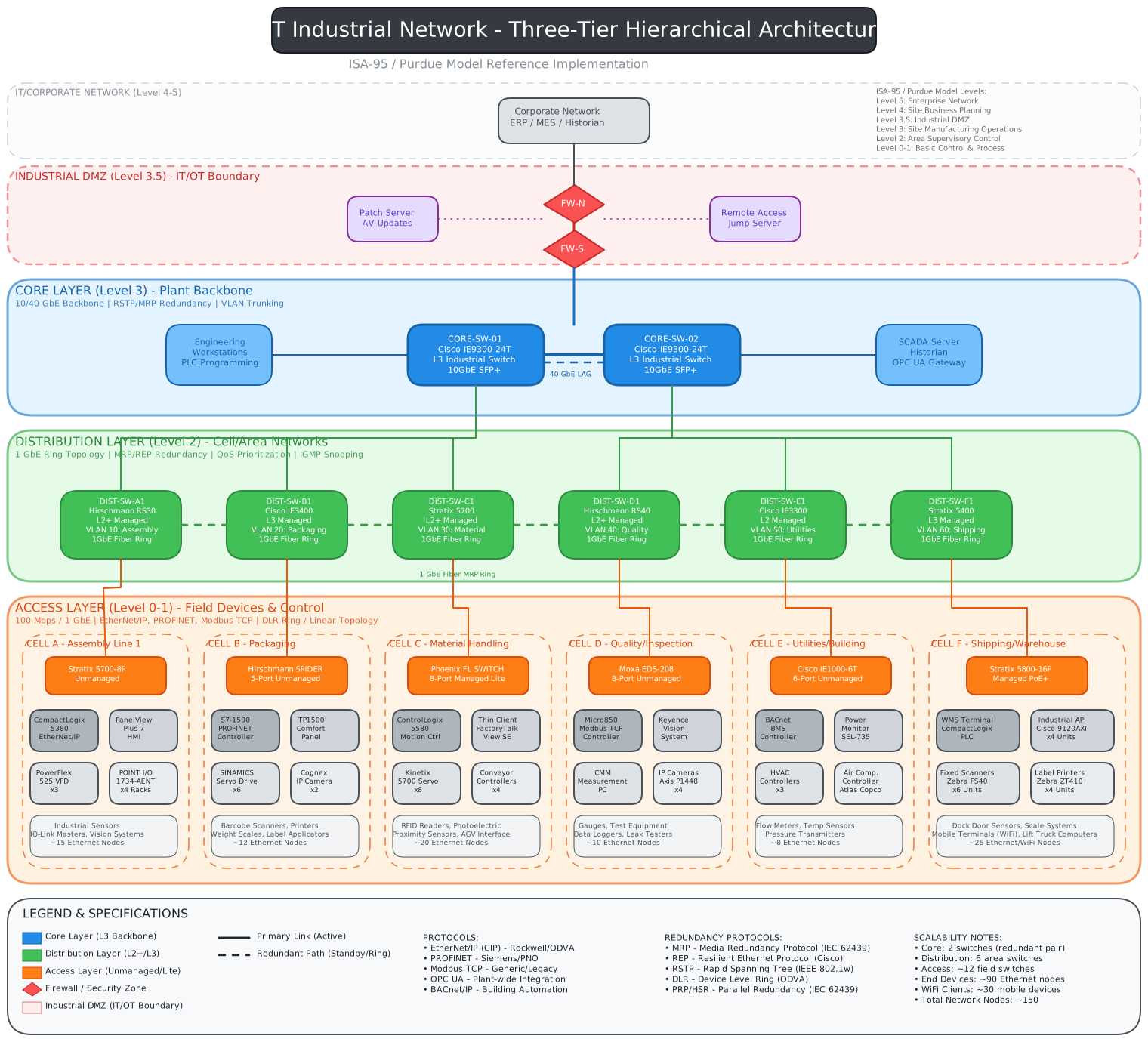
For industrial organizations, the implications are concrete. Network topology diagrams that document OT/IT boundaries can be generated directly from architecture descriptions. Purdue Model visualizations showing hierarchical network layers emerge from simple prompts. Authentication flows between devices, access points, and security systems materialize in minutes.
The organizations that capture this potential will be those who recognize that visual documentation is no longer a luxury requiring specialized skills. It is now accessible to anyone who can describe what they need.
The Ecosystem Evolves
Claude Code is not alone in this space. The broader ecosystem is converging on the same insight: AI can transform how we create visual content. MCP (Model Context Protocol) servers now bridge Claude with live Excalidraw canvases, enabling real-time diagram creation and editing through natural language. Custom Claude Code skills have emerged that automatically generate and update architecture diagrams as codebases evolve.
Tools like Eraser's DiagramGPT, Miro AI, and Mermaid Chart are approaching the same problem from different angles. The common thread is the recognition that the text-to-architecture era has arrived. The drag-and-drop paradigm that defined diagramming for decades is giving way to conversational creation.
Because Excalidraw files are JSON, they can be committed to Git repositories alongside code. This means architecture diagrams can live in the same pull requests as the code they document, with full diff visibility and version history. Diagrams become living documentation that evolves with your systems.
Developing the Skill
Like any capability amplified by AI, the value you extract depends on your ability to direct it effectively. The skill is not in using Claude Code itself. The skill is in knowing what diagrams would be valuable, when to create them, and how to describe them clearly.
The critical skills become:
- Visual Thinking: Recognizing when a concept would benefit from visual representation
- Clear Description: Articulating the elements, relationships, and flow you want to capture
- Iterative Refinement: Knowing how to guide Claude toward the exact output you need through conversation
- Format Awareness: Understanding when different diagram types (flowcharts, sequence diagrams, architecture diagrams) are appropriate
- Quality Judgment: Evaluating whether a generated diagram effectively communicates the intended concept
These skills compound. The more diagrams you create, the better you become at describing what you need. The better your descriptions, the higher quality your outputs. The higher quality your outputs, the more valuable visual communication becomes in your work.
The Path Forward
We are at the beginning of a transformation in how knowledge workers create and consume visual information. The statistics are clear: visual communication drives productivity, enhances collaboration, and improves retention. The barrier has been the creation process itself.
That barrier is falling. When diagrams can be generated in minutes through natural language, the calculus changes. The question shifts from "Is this diagram worth the time to create?" to "What would I understand better if I could see it?"
What ideas, processes, or systems in your work would benefit from visualization that you have never diagrammed because the effort was not justified? That backlog of unvisualized knowledge represents an opportunity. The tools to address it are now available.
The organizations and individuals who embrace this capability will communicate more clearly, align more quickly, and document more thoroughly. Those who continue to treat diagram creation as a specialized, time-intensive task will find themselves at an increasing disadvantage.
Visual communication has always been powerful. Now it is accessible. The only question is whether you will use it.
Rapid Visualizations: Created in Minutes
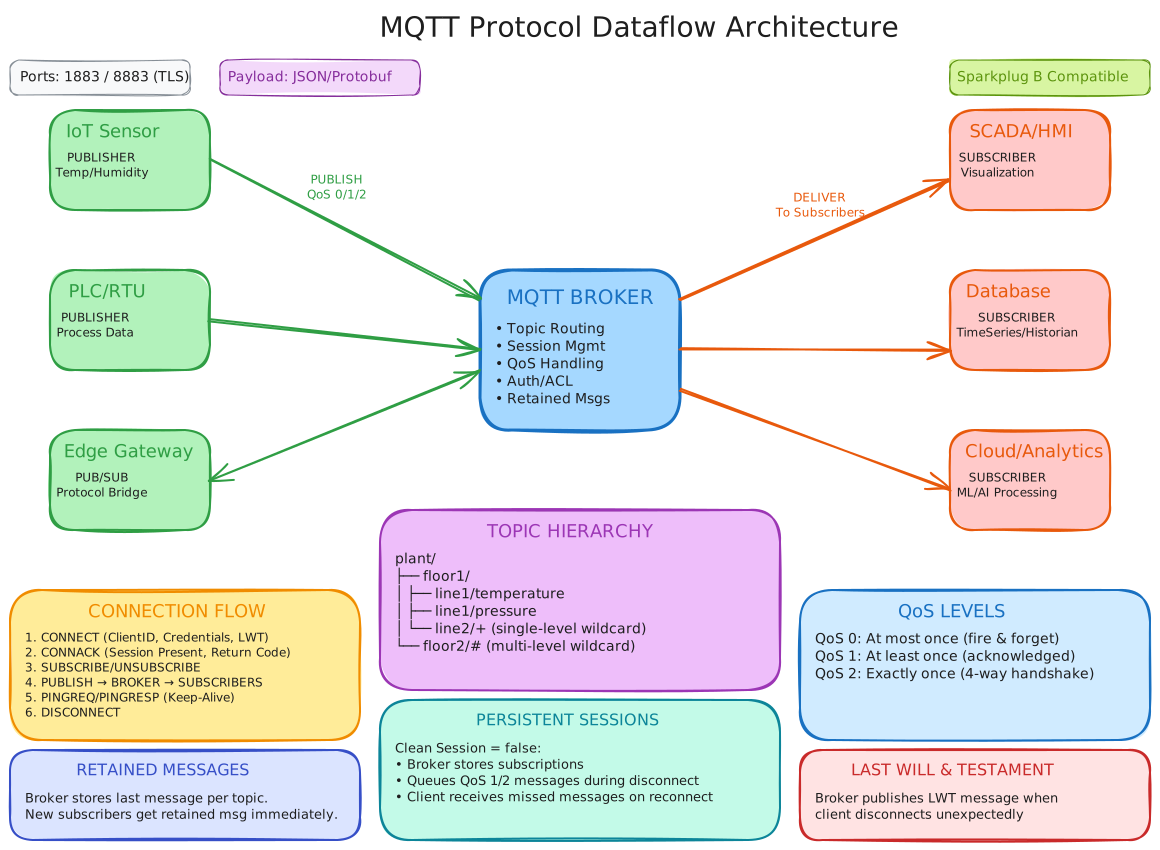
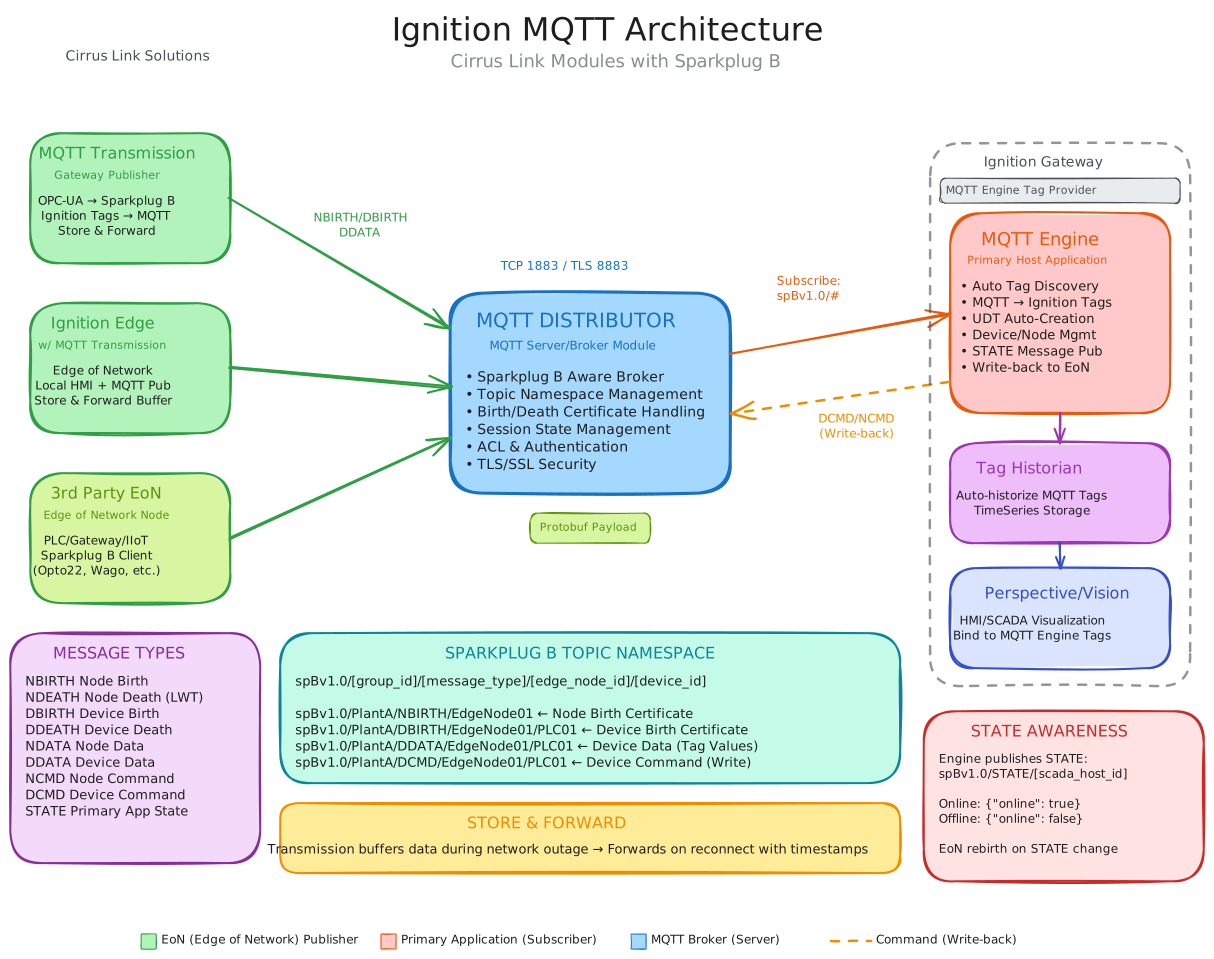
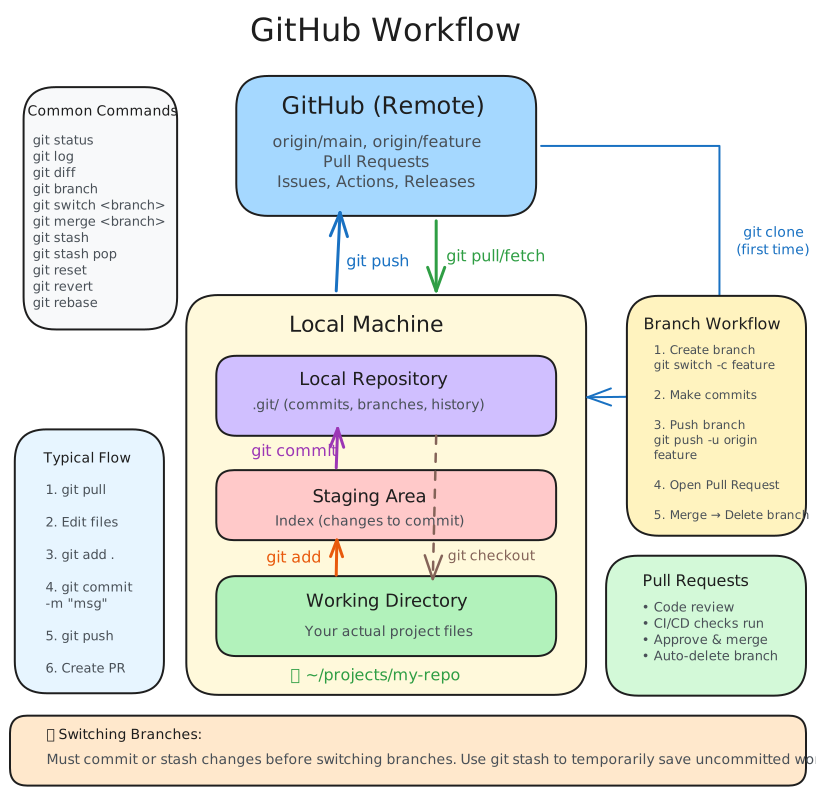
The following diagrams were generated using Claude Code in a matter of minutes. Each represents a concept that would traditionally require significant time investment to visualize properly. With conversational AI, they emerged from simple prompts like "create an Excalidraw JSON of the MQTT protocol architecture".
MQTT Protocol Architecture
A publish-subscribe messaging pattern showing broker communication flows.
MQTT with Ignition SCADA Integration
Industrial IoT architecture connecting edge devices through MQTT to Ignition SCADA.
GitHub Workflow
Version control workflow showing branches, commits, and collaboration patterns.
Purdue Model OT Network Architecture
ISA-95 hierarchical network model showing IT/OT boundaries and security zones.
Each of these diagrams represents knowledge that previously existed only in documentation or in someone's head. Now it is visual, shareable, and immediately comprehensible. This is the power of removing friction from visualization.
Sources:
Canva Visual Communication Report 2025 |
Custom Claude Code Skill for Excalidraw |
AI Diagramming Tools 2025 |
Excalidraw AI Features |
Productivity Statistics 2025